If you would like to restart your application while chatting with HireVue Hiring Assistant, you can do this at any point during your conversation prior to scheduling your interview. To restart your conversation text "RESTART", followed by option 1 to restart your application from the beginning. Choose a new location/job and complete your application.
If you would like to restart after you’ve already scheduled your interview, you’ll need to withdraw your current application and begin the process again. This will also cancel any scheduleded interviews. To do this text "CHANGE" to the phone number you've been chatting with to bring up options related to your interview:
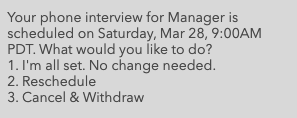
Select option 3 to "Cancel & Withdraw" (this will cancel your current interview).
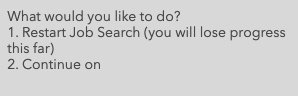
Text "Restart" at any point, which will bring up the following options:
Note: HireVue Hiring Assistant is a separate system that an employer may use to automate some of its hiring processes. Though HireVue Hiring Assistant can be used to help you find a position you’re interested in, and may even provide an application link, you may need to visit your candidate profile on the company’s career site, or contact a recruiter directly to update any personal information on your application.