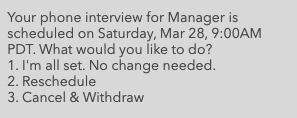
To cancel your scheduled interview, you can text 'Cancel' to the phone number that you've been chatting with. This will bring up details of your scheduled interview. Choose option 3 'Cancel & Withdraw' to cancel your interview.
Note: At any point, you can text "Restart" to start a conversation again and search for jobs from the beginning of the application process.
If you're unsure of what phone number you were texting, or if you had applied via chat on the company's website, please refer to the interview confirmation email that was sent when your interview was scheduled. The phone number is usually present below the email signature, or the Hiring Manager may have been cc’d on the email. If you are unable to locate the number that you were texting, you will need to restart the application process from the company’s career site.
Any other questions regarding the position or company that you applied to should be directed to the hiring company specifically, or you may review the company’s career site, as they may have additional information there.